글

Python - File, directory manipulation

First you should import os modules. import os Get current working folder import os dir = os . getcwd() print(dir) Change current working directory import os dir = os . getcwd() print(dir) os . chdir( "/home" ) dir = os . getcwd() print(dir) Get absolute path for specific path import os dir = os . getcwd() print(dir) os . chdir( "/home" ) dir = os . getcwd() print(dir) os . chdir( "pi" ) abs_dir = os . path . abspath( './rpi-rgb-led-matrix' ) print(abs_dir) # '/home/pi/rpi-rgb-led-matrix' Get only directory name in path import os dir = os . getcwd() print(dir) os . chdir( "/home" ) dir = os . getcwd() print(dir) os . chdir( "pi" ) abs_path = os . path . abspath( './rpi-rgb-led-matrix' ) print(abs_path) dir_name = os . path . dirname( '/home/pi/rpi-rgb-led-matrix/README.md' ) print(dir_name) # '/home/pi/r...

Python Jupyter Notebook with VSCode

이미지
If you are a Python developer, I highly recommend watching this video from Microsoft VS Code Team . Many Python developers use Jupyter notebooks during development. Jupyter notebooks are usually easy to debug because they can be executed block by block in a web browser. Microsoft has finally improved the Python extension to enable running Jupyter Notebooks in VSCode. VS Code's Python extension allows you to save files created with Jupyter Notebook (ipynb) as files with the py extension. And the saved py extension file is compatible with Jupyter Notebook in Vs Code. This feature is amazing. If you watch this video, you will have no choice but to turn your Python development tools into VSCode. Install Python extension  First in the VSCode, install python extension from Microsoft. Then open or make a new python file. You can see that the Python source code is syntax highlighted. And at the bottom of VSCode you can see your current Python. If you are using multiple Py...

Remote C/C++ Debugging with VSCode

이미지
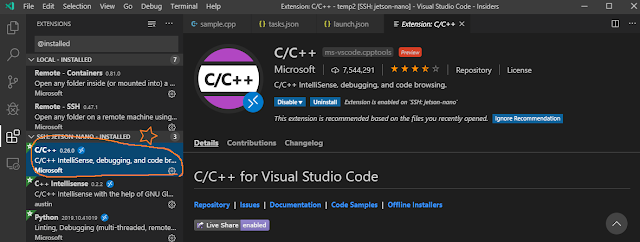
This article is old and an updated article exists at https://tipspiggy.blogspot.com/2022/05/remote-cc-debugging-with-vscode-1.html . Please read this article after reading my another article https://tipspiggy.blogspot.com/2019/10/remote-python-debugging-with-vscode.htm l. You can use VSCode or VSCode Insider for C/C++ remote debugging. But I recommand you use VSCode Insider. Be Careful : At the present time(2019.10), this article does not apply to Raspberry Pi, Jetson Nano those are based on ARM CPU.   I'm going to use a X64 based Ubuntu 18.04 remote server. Prerequisite Before you setup a remote c/c++ development environment, install c/c++ build tools on the remote server. sudo yum install gcc gcc-c++ make gdb    Installation Do the same steps as in my article . From now on, I will assume that you have installed three packages(VSCode, Remote Development Extension, Python Extension). And Remote SSH connection setup is completed. Install C...

Remote Python Debugging with VSCode

이미지
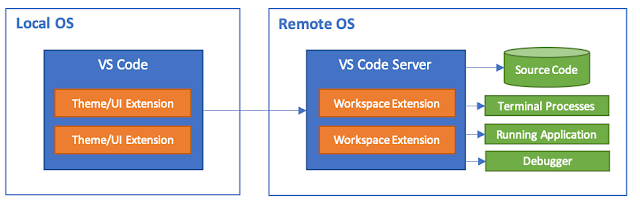
  last updated 2020.08.20 In VSCode, remote debugging is possible with id/password method without generating ssh key. See VSCode Remote Python Debugging without ssh keys .  If you are Korean, there's a same article written in Korean(한글) at https://github.com/raspberry-pi-maker/RaspberryPi-For-Makers/blob/master/tips/chap-01/vscode.md .  Most programming tasks on Linux systems use remote tasks using SSH terminal. Some developers passionately likes the vi editor but beginners who are not good at vi command want to use GUI IDE(Integrated Development Environment) like Microsoft Visual Studio. In this article, I'll show you how to set up remote development environment for Python. Remote system may be Raspberry Pi, Jetson Nano or X64 Linux systems. So you can apply this method to most systems. Because the process runs on a remote target machine, you do not need to install any source code or development tools on your local machine. In addition, despite the differences in op...